Streamline Your Parking App Design with This UI Kit
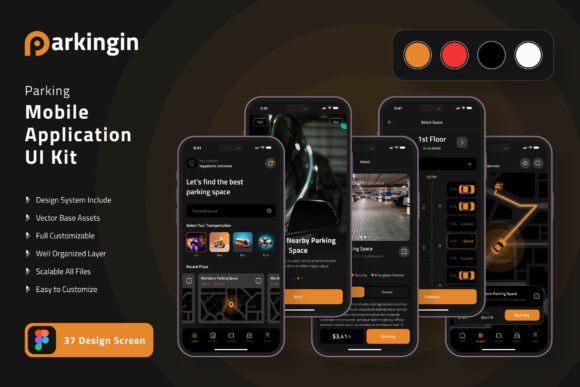
Imagine launching a sleek, professional parking application without starting your mobile UI design from a blank canvas. That's the promise of a comprehensive UI kit, and the Parking Application Mobile UI KIT delivers exactly that, offering a powerful shortcut to a polished digital product.
This resource is a collection of 37 high-quality, pixel-perfect templates designed specifically for parking and mobility applications. It’s not just a set of static screens; it’s a fully editable design system built in Figma, packed with over 80 UI elements and 100% scalable vector graphics. For designers and developers, this means you can focus on the unique features and user experience of your app rather than reinventing fundamental interface components.
Why a Specialized UI Kit is a Smart Design Asset
Using a pre-built kit like this accelerates the entire development process. You bypass the initial, time-consuming phase of creating every button, icon, and layout grid from scratch. This is invaluable for startups, freelance designers working on tight deadlines, or teams prototyping a new concept. The kit provides a consistent visual language from the start, ensuring your brand identity feels cohesive across every screen, from the user dashboard to the payment confirmation page.
The true value lies in its customization. Every element is fully layered and uses symbol objects in Figma, allowing you to easily swap components, adjust colors, and modify layouts to match your specific vision. Need to add a new feature for electric vehicle charging spots or remove a section for valet services? The flexible structure makes it straightforward to tailor the templates to your exact needs, ensuring your final application is both unique and functionally robust.
Practical Applications for Your Project
This UI kit is versatile enough to support a range of projects within the parking and urban mobility space. Consider these use cases:
- Rapid Prototyping: Quickly build an interactive prototype to test user flows and gather feedback before writing a single line of code.
- Startup MVPs: Develop a visually impressive minimum viable product that looks professional and trustworthy, helping to attract early users and investors.
- Client Presentations: Use the high-fidelity screens to present a clear and compelling vision of a proposed app to clients or stakeholders.
- Design System Foundation: Leverage the kit as a starting point for a more extensive, custom design system for a larger mobility platform.
The included free icons and fonts further streamline the process, giving you a complete toolkit to create a seamless user experience. When selecting any design asset, always check that its license aligns with your project's commercial goals and review the available styles to ensure they match the mood you want to convey—whether it's futuristic, minimalist, or friendly.
Ultimately, choosing a well-crafted resource like the Parking Application Mobile UI KIT is about investing in quality and efficiency. It empowers you to produce a mobile application that feels intuitive, looks contemporary, and functions smoothly, allowing your innovative service idea to take center stage without being hindered by design bottlenecks.