Prolytic Project Management Dashboard: A Modern Template
Imagine a workspace where every task, metric, and collaboration point is perfectly organized, reducing clutter and boosting focus. The Prolytic Project Management Dashboard delivers this clarity, offering a modern, pixel-perfect UI template designed to elevate any team collaboration platform or productivity application.
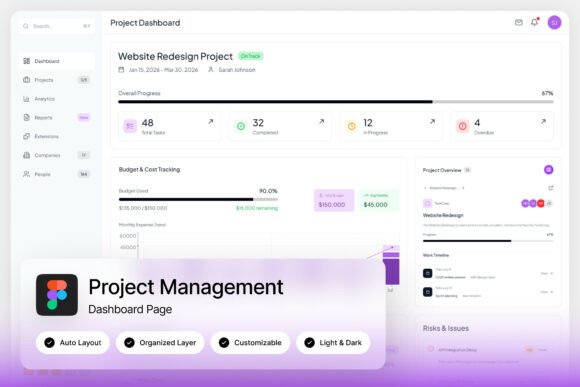
This isn't just a visual mockup; it's a comprehensive design asset built for real-world application. Featuring two high-resolution admin dashboard screens at 1440×1024 px, it provides a robust foundation for developers and designers creating workflow systems, task organization services, or SaaS products. The fully customizable Figma file allows you to adapt layouts, colors, and components to match your brand identity seamlessly.
Key Features for Seamless Integration
The Prolytic template stands out with its professional, management-focused UI components. Its well-organized, named, and grouped layers in Figma make it incredibly easy to edit and scale. You get both a light and dark mode interface, ensuring your dashboard design is versatile for different user preferences and environments. The inclusion of free Google Fonts and a help guide means you can start building immediately without hunting for resources.
For designers and product teams, this template is invaluable for several practical scenarios:
- Rapid Prototyping: Quickly build interactive prototypes for client presentations or user testing, saving weeks of design time.
- Brand System Development: Use the dashboard's clean, modern typography and layout as a springboard to develop a cohesive visual language for your brand, from logo design to web design.
- UI/UX Foundation: Extract reusable components, charts, and navigation patterns to build a consistent design system for your own applications.
Practical Tips for Using the Template
When working with a premium design asset like this, a few tips ensure you get the most value. First, leverage the organized layer structure to quickly locate and modify elements. Test your font pairings early; the template uses Google Fonts, making it easy to swap in a complementary sans serif or serif font that matches your project's mood, whether it's a sleek tech startup or a creative agency.
Always review the provided help guide. It often contains insights on how to best utilize specific components or maintain design consistency. Since the template is pixel-perfect, your final output will look polished and professional, which is crucial for building trust with users in a dashboard environment. This level of detail in your design assets directly contributes to a stronger brand identity and more effective user experience.
Choosing the right design templates is about more than just aesthetics; it's about efficiency and quality. A well-crafted dashboard template like Prolytic provides a reliable, stylish foundation that lets you focus on solving user problems rather than reinventing the UI wheel. It’s a smart investment for any team aiming to build professional, collaborative platforms with a modern, user-centric interface.